
Blog
Recent Posts
Removing Powder from the lens
When I teach basic training, one question I often seem to get is what to use to wipe the lens if powder gets on it. I don't like to use paper towels or anything that can be abrasive. I thought about using the soft cloths you can get at a LensCrafters so you would not scratch the lens, but I didn't want to have a ton of them and have to keep washing them after every patient.
I found these disposable lens-cleaning cloths in my local pharmacy. We tear one off when we are ready to do a CEREC. When I'm looking at the monitor and see that I have a spot of powder on my lens, I don't even have to look up. I just remove the camera from the patient's mouth, my assistant quickly removes the powder, and I'm right back to taking pics.
Once we are done with all the images, we just toss the cloth we used. Here is a pic of the brand that I found. I'm sure that there are many different brands out there. I just know that it can be costly to replace a scratched lens, so we make sure to keep these around for every case.

Welcome to the 21st century
I just had the chance to sit in on an implant technique course. It was a course that I originally took 15 years ago, but as we all know, the world of implant dentistry has changed a little. Or I should say that my implant dentistry has changed a lot. It was nice to see how there have been some changes in techniques, but nothing I would describe as revolutionary. Some tweaking of principles and materials from years of experience.
There was a surgeon there who was the sponsor of the event. Very nice guy and knowledgeable, but a not a big believer of guided placement. For routine placement, the additional expense of a guide would make the patient decline treatment and irritate the referring dentist. The surgeon didn’t want to get tied into a specific location because the bone might not be good there.
There was a lab guy there who was also knowledgeable. Gave great insight on the larger cases. When we were diagnosing, he was very familiar with the principles of facially generated treatment planning. He was able to answer every question but one, and that one was from me: “What is an Implant handling fee?” He offered an explanation and I told him it didn’t make any sense. I told him it is a remnant of times past when dentists didn’t know any better. Implant dentistry is not rocket science; there is no reason to be intimidated.
I am not saying that all the tried-and-true methods that have given us success in the past need to be forgotten, but as with most things in life, we need to see how the technological advances of the day can make our lives better.
Calendars with pencils, pegboards and card files, film and diptanks – I can’t imagine going back. Digital imaging and computerized practice management software have allowed us to streamline the practice.
Shouldn’t dentists have the same opinion on technology and implants?
People are going crazy over curing lights that save a few seconds, bulk fill materials that may save a minute or two. Why wouldn’t people be interested in making their implant dentistry easier and more predictable? Know how the bone is before dropping a flap, know where the implant should be placed for an ideal restoration, be able to have the temp prepared prior to the surgery, and be able to produce perfect custom abutments designed for the idea restoration. The advantages are huge; in the words of a popular commercial – PRICELESS.
CREATING AN ESTHETIC SURFACE TEXTURE
One of the keys to success with anterior CEREC restorations is the ability to create an esthetic surface texture. Too often, when restorations come out of the milling unit, doctors simply assume that they can just glaze them without any other work and place them in the mouth. This leads to a good restoration but not a great one. To get a great restoration, you must take the time to remove the bur marks from the milling unit prior to stain and glaze.
In the example below, a patient presented to the office with a fractured central incisor. The patient had received porcelain veneers approximately six years earlier in another office. When the restoration fractured, we used Biogeneric Reference to match the adjacent central incisor.
Now, when the images are taken, the clinician must – and this is mandatory – follow the appropriate sequence to ensure that the surface texture and luster of the restoration matches what is on the other restorations.
Typically, when the restoration comes out, I will contour the restoration using a fine diamond. This most often is done in the mouth due to the nature of CEREC one-visit dentistry, but can obviously be done off a model.
Once the restoration is contoured, the convex areas are polished with a rubber wheel. You can typically leave the concave areas a bit dull, but polish anything that is convex. After polishing is when we do our stain and glaze.
Now here is the critical part- after stain and glaze: rubber wheel the glaze off the restoration. You want to remove the shiny look and simply have a dull finish.
It’s not the stain and glaze that gives the restoration its luster, it’s the saliva in the mouth. Prove this to yourself by looking at an extracted tooth. It’s rarely shiny, but the surface is polished. It’s the saliva that gives it the luster.
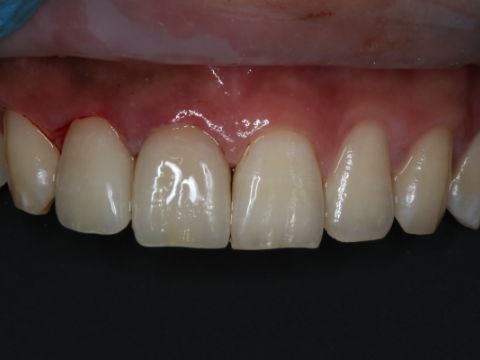
This is exactly the sequence that was followed on tooth #8 below. You can see the luster and shade matches the adjacent teeth. If I had to rate this restoration, Id rate it an 8/10 because what I should have done was given it a bit more surface texture to match #9. Close, but no cigar. Regardless, I hope you get the concept of treating anteriors with the CEREC.

Using cerec on multiple patients at the same time
There are many times when we have to use our CEREC machine on multiple patients at the same time. I have received questions on what is the easiest way to open a second case. I will also show a problem that can occur when opening a second case, and how to combat it.
The easiest way to open a second patient is to click on the Windows button at the lower left of the keyboard.

Click the button and the Start menu will open. Click on the icon that says CEREC SW4. This will open a second program, and you can begin to enter the patient info.

The issue we can run into is locking up the camera on the second patient. If the camera in the first case is in the Acquisition phase, it will not be able to be activated and used in the second case. You will see an error message like this:

If you are sharing your AC with another doctor, make sure that you take the images and then go past the Acquisition phase into the Model phase. Once you do that, the camera will be active, and you will be able to image on the second patient.
Digital Planning
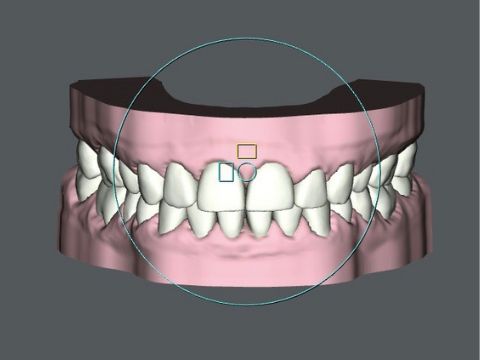
I'm too lazy to take impressions, pour them up, take out calipers and measure the proportions coming up for a rehab. A quick scan and I can measure the diastema, split in half, and see if I can remove that much from the distal of the Central Incisor. Then I measure to see if I can get to Width to Length Ratio of 75-80 % for the Central. The only thing left is to click a button and have the virtual wax up fall into place
Simple Bonding Technique for an Onlay
Everyone in the past would use a tofflemeier matrix band to seat partial restorations. I found this difficult to do as the closed loop system would prevent it from seating all the way, hanging on the neck of the band
4 friends of mine, jumped shipped, and advised me to use a sectional band so it would keep me out of trouble.
Do yourself a favor and try this approach instead. Works like a charm


It's all in the prep!
The day goes by so much more smoothly when you think like the milling machine. Perfect preps and good imaging leads to restorations dropping in at seat. Here are some pointers for partial restorations with regards to fit:
1. Make sure your exit angles have a slight flare taper so that you can see all point angles in the boxes
2. Make sure the isthmus at the occlusal table is wider than the isthmus at cavosurface when you have a lingual or buccal finger / extension. Otherwise, the bur has to mill back on itself and it can shatter the restoration
3. At the path of draw view, make sure you see an uniterupted blue line like the image below. If you don't. then that means there is an undercut that will be milled and you won't be able to seat the restoration.
4. The yellow shadow is a good warning also if you have undercuts.

RESTORING ANTERIOR TEETH THAT HAVE HAD ROOT CANAL THERAPY
In my last blog, I talked about how to go about restoring a posterior tooth after it had been treated endodontically. The consensus in the literature clearly states that when you have a posterior tooth treated by endo, do a full-coverage restoration. No ifs, ands or buts.
However, how should you go about treating an anterior tooth that has had root canal therapy but needs restorative work?
Below is a case that was posted on the forum. It was posted for other reasons; however, what caught my eye was the restoration on #9 with the endo access in the lingual.

So my question is, would you have prepped the same way or would you have done a full-coverage restoration? This comes up quite a bit and the answer may surprise you. As we discussed, in the posterior, we want full coverage. In the anterior, however, do all you can to preserve the cingulum and avoid doing a full coverage.
In fact, I would have treated this tooth exactly the same way, as two separate restorations. An anterior all-ceramic with a separate composite closing off the endo access.
The weakest area in anterior teeth is the lingual fossa, and this is the area that causes the tooth to flex significantly when it is undergoing excursive movements.
What compensates for the flexing is the cingulum. If you cut the cingulum away, you significantly weaken the tooth.
To summarize: Posterior teeth, full coverage. Anterior teeth, partial coverage if a restoration is needed. If this was a virgin tooth, close the access with composite and call it a day.
The ProDrive
Sometimes you have something, but you really don’t know how good it is until you force yourself to use it.
I have been interested in improving my handpieces by converting to electric, but have been put off by the cost. Always seems there is something that takes priority. I am also a very cheap person.
So, a few years ago my handpiece service guy comes in and talks to me about a product – ProDrive.
It is a turbine replacement for you existing handpieces, which due to its innovative design, increases the power output of your handpiece. They have kits for many of the handpieces on the market; your Paterson rep can help you out with what models are available. I still use the Star 430s that I started with in dental school. The ProDrive is almost a direct replacement for my Star push-button Autochuck. Maybe a slight increase in height, but not something that has made a clinical difference.
The other part of the equation is that this turbine does require a special bur. The good news is that these burs are manufactured by Meisinger, a premier bur manufacturer, the same company that produces the depth router burs. Not every shape of carbide or diamond is available, but there selection is extensive.
These turbines are well-made, no additional vibration noted during their use. No special maintenance has to be performed on these turbines to keep them in top shape.
More power in the handpiece, great cutting diamonds, throw in an Isolite and liquid reference and you have the recipe for a fast and efficient appointment.
HOW TO IMAGE CONTACTS
The other day on the message boards, we had a site member post a question about how to solve an issue he was having. I strongly recommend visiting our message board, as questions are usually answered very quickly and fantastic discussions arise with great information contained in the conversations.
The problem he discussed was how to capture the interproximal data on adjacent teeth to a tooth that you are prepping. I've created a short video to show how to properly angle your camera to accurately image the interproximal areas. Please watch it and leave any comments or questions in the comment section. Enjoy.